Written by
Marcus Rivera
Creator Tech Reviewer & Former Audio Engineer
Marcus spent 6 years doing live sound before pivoting to creator gear reviews. He's tested over 200 pieces of audio equipment and now helps 50,000+ monthly readers find gear that actually improves their content.
99%
growth in live streaming viewership over recent years
Source: Statista Live Streaming Report
1080p
is the minimum resolution viewers expect from professional streamers
Source: Twitch Creator Insights
500M+
people watch live video content online every day
Source: YouTube Official Blog
Your camera determines what your audience sees every time you go live. According to Statista, live streaming viewership has grown by over 99% in recent years, with gaming, just chatting, and educational content driving the surge. The difference between a streamer who holds viewers and one who loses them in the first minute often comes down to image quality. A proper webcam removes the technical barrier — clean 1080p video, accurate autofocus, and reliable low-light performance let your personality and content do the work. This guide finds the best webcams for live streaming at every budget in 2026.
Who Is This Guide For?
Beginner
You're streaming from a laptop using its built-in camera and the image quality is clearly below what you see from other streamers. You want a plug-and-play webcam that immediately improves your on-camera presence for under $50.
Intermediate
You stream consistently and want 1080p clarity with autofocus that handles your movements. You're ready to invest $60–$120 in a reliable webcam from a trusted brand.
Advanced
You're producing polished stream content and want features like background removal, 60fps, or seamless integration with streaming software. You want a webcam that handles any lighting situation without manual adjustment.
Budget Tiers at a Glance
| Tier | Our Pick | Note |
|---|---|---|
| Budget | Logitech C270 or NIVEOLI 1080p | Plug-and-play reliability — solid starting point for new streamers |
| Mid-Range | Logitech Brio 101 or EMEET C960 | Full 1080p with autofocus and smart exposure adjustment |
| Premium | Logitech C922x | 720p/60fps and background removal for polished stream production |
Quick Comparison
| Product | Best For | Link |
|---|---|---|
Logitech C270 Webcam 720p Logitech | Budget streamers and video callers who need a reliable plug-and-play webcam | Amazon |
Logitech Brio 101 Full HD 1080p Webcam Logitech | Streamers and remote workers who want clean 1080p without spending on premium cameras | Amazon |
EMEET C960 1080P Webcam with Microphone EMEET | Streamers who want 1080p video and a decent built-in microphone in one device | Amazon |
Logitech C922x HD Pro PC Webcam Logitech | Streamers who need background replacement without a green screen | Amazon |
Webcam 1080P with Microphone & Privacy Cover (NIVEOLI) NIVEOLI | Budget-conscious creators who need 1080p with a physical privacy cover | Amazon |
Logitech C920x HD Pro Webcam Logitech | Streamers who want the most proven 1080p webcam on the market without the XSplit bundle | Amazon |
NexiGo N60 1080P Webcam with Microphone & Privacy Cover NexiGo | Streamers who want software-level control over image settings at a budget price | Amazon |
The Best Webcams — Ranked
Each product reviewed with honest pros, cons, and a clear recommendation on who should buy it.

Logitech C270 Webcam 720p
The Logitech C270 has been the entry point for affordable webcam video for years — and for good reason. Plug-in USB, 720p output, and Logitech's driver reliability mean it just works without setup friction. For creators in well-lit rooms who don't need 1080p, it delivers clean, stable video.
Resolution
720p (1280x720)
Frame Rate
30fps
Focus
Fixed
Microphone
Built-in mono
PROS
- Plug-and-play USB — recognized by every streaming app instantly
- Logitech build quality and driver support outlasts cheaper alternatives
- Compact and light — clips securely to any monitor
- Very low price makes it a zero-risk first webcam purchase
CONS
- 720p output falls short of 1080p competitors at similar prices
- Low-light performance degrades quickly without good room lighting
- Fixed focus only — no autofocus for close-up or varied distances

Logitech Brio 101 Full HD 1080p Webcam
The Logitech Brio 101 brings 1080p full HD into a slim, privacy-first design aimed at hybrid work and streaming. The RightLight auto-exposure handles changing room lighting automatically, and the physical privacy shutter gives creators peace of mind when the camera is off between sessions.
Resolution
1080p (1920x1080)
Frame Rate
30fps
Focus
Auto
Privacy Shutter
Yes
PROS
- Full HD 1080p at 30fps delivers noticeably cleaner image than 720p competitors
- RightLight auto-exposure adjusts to window light changes in real time
- Physical privacy shutter built into the housing
- Show Mode support for displaying content below the camera
CONS
- 30fps only — no 60fps for smoother fast-motion content
- Built-in microphone is functional but benefits from a dedicated mic
- No manual exposure or color controls

EMEET C960 1080P Webcam with Microphone
EMEET designed the C960 as an all-in-one streaming solution — the dual built-in microphones with noise reduction reduce the need for a dedicated mic for casual streamers. 1080p autofocus handles changing distances without going soft, making it practical for creators who move around at their desk.
Resolution
1080p
Frame Rate
30fps
Field of View
96°
Focus
Autofocus
PROS
- Dual built-in mics with noise reduction reduce echo for casual streaming
- 1080p autofocus adjusts when you lean back or forward at the desk
- Wide 96-degree field of view captures more room context
- Plug-and-play — no software installation required
CONS
- Built-in mic quality doesn't replace a dedicated external microphone
- Wide FOV can make the background more visible than desired
- Autofocus occasionally hunts in low-contrast lighting

Logitech C922x HD Pro PC Webcam
The C922x is the streaming-specific evolution of Logitech's webcam line. The 1080p/30fps and 720p/60fps modes give streamers flexibility across different content types, and the included XSplit license and background removal algorithm make virtual background streaming more seamless than most webcam alternatives.
Resolution
1080p/30fps or 720p/60fps
Focus
Autofocus
Background Removal
Yes (software)
Mount
Monitor clip + tripod thread
PROS
- 720p/60fps mode delivers smooth motion for fast-paced gameplay streams
- Background replacement works without a physical green screen
- Compatible with all major streaming platforms and apps
- Flexible mounting — clips to monitor or attaches to tripod
CONS
- 1080p is capped at 30fps — 1080p/60fps requires a camera upgrade
- Background removal quality drops significantly in poor lighting
- XSplit bundle adds cost that streaming-only users may not need

Webcam 1080P with Microphone & Privacy Cover (NIVEOLI)
The NIVEOLI webcam delivers full 1080p output at the lowest price point in this category. The physical privacy cover slides over the lens when not in use — a feature usually reserved for higher-priced models. For creators who primarily use a separate mic and just need clean video, this is a strong value option.
Resolution
1080p
Frame Rate
30fps
Privacy Cover
Physical slide cover
Focus
Fixed
PROS
- 1080p at a price point that undercuts most branded alternatives
- Physical privacy cover included — slides over lens when not filming
- Plug-and-play USB — compatible with all major streaming software
- Flexible clip fits monitors of various thicknesses
CONS
- Low-light performance is notably weaker than Logitech alternatives
- Built-in microphone is basic — use an external mic for any serious audio
- Brand support and long-term driver updates less established

Logitech C920x HD Pro Webcam
The C920x is arguably the most battle-tested webcam in streaming history — the same optics and sensor lineage that made the C920 the default choice for a decade, minus the XSplit license bundled with the C922x. Full HD 1080p/30fps, dependable autofocus, automatic light correction, and dual mics cover the essentials, and its compatibility list runs from Zoom and Teams to the Nintendo Switch 2's GameChat mode.
Resolution
1080p (1920x1080)
Frame Rate
30fps
Focus
Autofocus
Light Correction
Automatic
PROS
- Proven 1080p/30fps image quality with reliable autofocus
- Automatic light correction adapts to changing room light
- Works across Zoom, Teams, Google Meet, OBS, and Switch 2 GameChat
- Logitech driver support keeps it compatible for years
CONS
- No 60fps mode at any resolution — C922x holds that advantage
- No physical privacy shutter included
- Dual mics are serviceable but a dedicated mic still sounds better
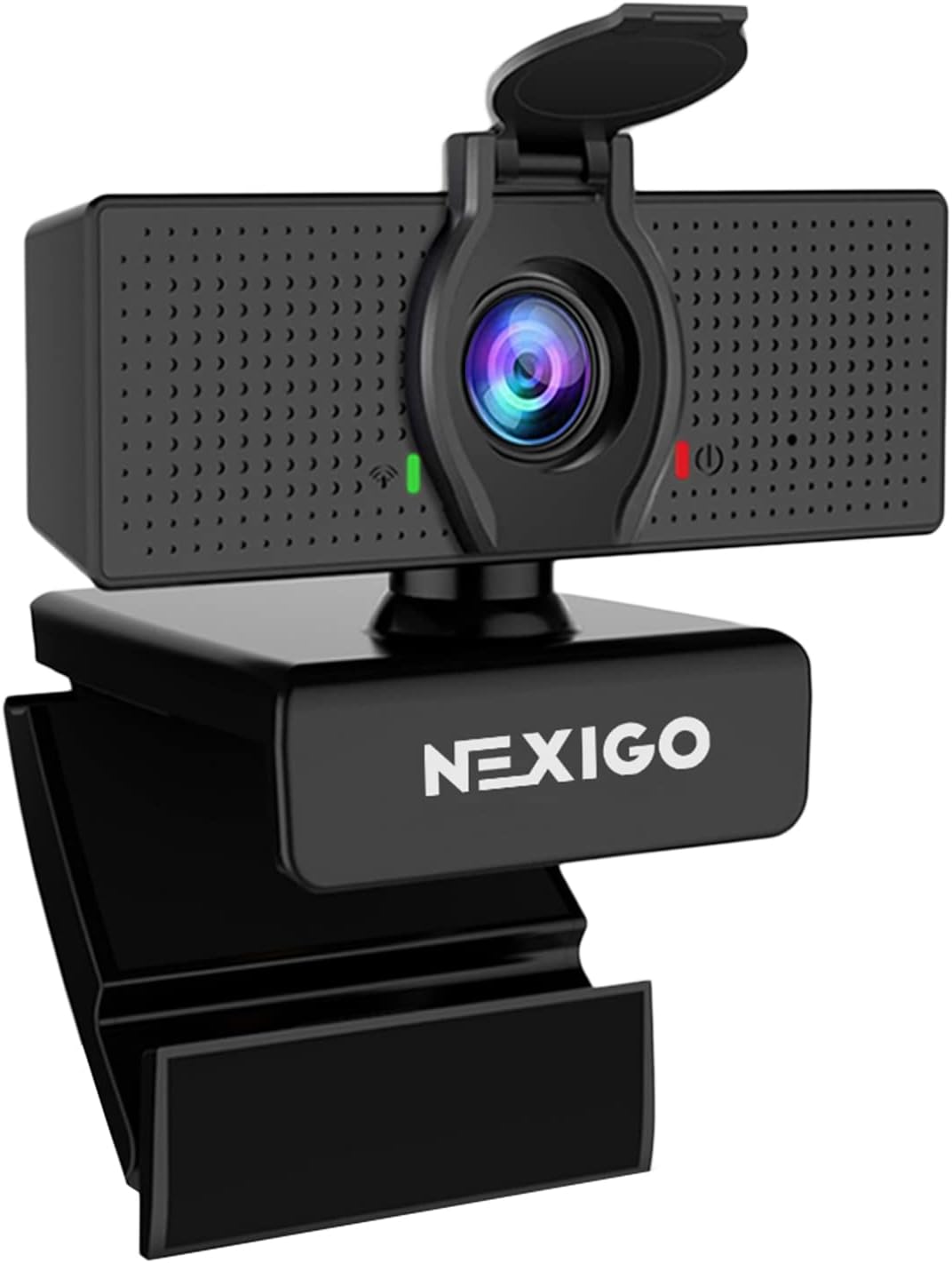
NexiGo N60 1080P Webcam with Microphone & Privacy Cover
The NexiGo N60 became one of the best-selling budget webcams for a simple reason: it pairs 1080p output with actual software control — exposure, contrast, and saturation adjustments that most webcams at this price lock away. The 110-degree lens captures a wider scene than typical webcams, and the included privacy cover flips over the lens when you're off the air.
Resolution
1080p
Field of View
110°
Privacy Cover
Included
Control
Software adjustable
PROS
- Companion software unlocks exposure and color controls rare at this price
- 110-degree wide-angle lens fits two people or a full desk scene
- Physical privacy cover included in the box
- Plug-and-play with Zoom, Skype, Teams, and OBS
CONS
- Fixed focus — sharpness drops if you move well off the set distance
- Wide angle shows more of your room — background prep matters
- Built-in mic is fine for calls but thin for content production
Buying Advice: What to Know Before You Order
Resolution matters less than lighting — a 1080p webcam in a well-lit room outperforms a 4K webcam in a dim room every time.
Autofocus is worth paying for if you move around at your desk — fixed-focus webcams go soft when you lean back.
Built-in microphones are convenient but rarely stream-quality — pair any webcam with a dedicated mic for noticeably better audio.
Check your streaming software compatibility — all major webcams work with OBS and Streamlabs, but double-check for niche platforms.
A physical privacy shutter is worth prioritizing — it removes any worry about camera access when you're not streaming.